chemfig
Advanced usage
2 Displaying atoms
Once a molecule has been split into atoms, the macro \printatom is called internally by chemfig in order to display each atom. Its only argument consists of tokens read in the molecule code representing the current atom (e.g., “H_3”); when the use atom strut key is set to ⟨true⟩, a \vphantom is added to this argument (see section 7.3). This macro switches to math mode and displays its argument using the math font “rm”. It is defined by the following code:
\newcommand*\printatom[1]{\ensuremath{\mathrm{#1}}} when compiling with LaTeX
\def\printatom#1{\ifmmode\rm#1\else$\rm#1$\fi} when compiling with \(\varepsilon\)TeX
One can modify the code of this macro to customize how atoms are displayed. In the following example, we redefine \printatom so that each atom will be enclosed in a rectangular box:
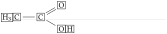
\fboxsep=1pt

\renewcommand*\printatom[1]{\fbox{\ensuremath{\mathrm{#1}}}}

\chemfig{H_3C-C(=[:30]O)(-[:-30]OH)}
Here is how to redefine it to use the “sf” font family of math mode:

\renewcommand*\printatom[1]{\ensuremath{\mathsf{#1}}}

\chemfig{H_3C-C(=[:30]O)(-[:-30]OH)}